Guides & Tips

Guide to Ergonomic Seating

Optimize your daily workstation posture, relieve lower back strain, and select the right support features for long working hours.

November 8, 2026 • Robert Brown • 7 min read
Posture Mechanics

The Foundation of Spinal Wellness at Your Desk

Guide to Ergonomic Seating

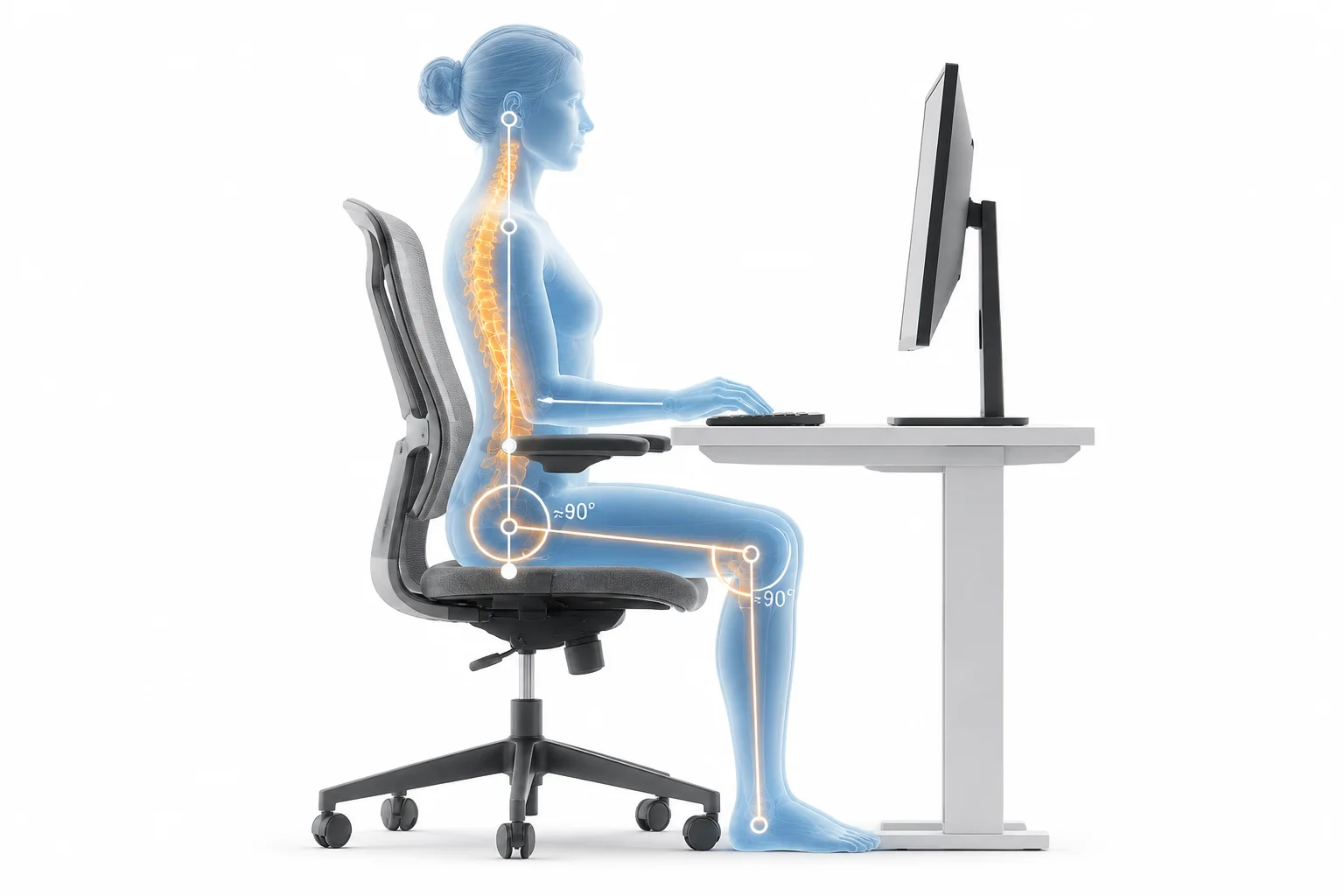
Prolonged sitting places uneven compressive stress across the lumbar spine and pelvis, gradually altering natural curvature when chairs lack dynamic ergonomic support. Achieving lasting comfort requires matching chair mechanics directly to your body's neutral anatomical resting lines.

Ergonomic seating is not about holding a rigid, frozen military posture throughout the day. Instead, it enables active micro-adjustments where your feet rest flat, elbows form open right angles, and the lumbar curve receives consistent firmness regardless of subtle shifts during demanding workflows.

Core Metrics

Key Posture Angles and Pressure Metrics

01
90°–100° Optimal knee and hip flexion angle
02
40% Less Spinal disc strain with lumbar contouring
03
2–3 Inches Clearance between knees and seat edge

Essential Ergonomic Checkpoints

  • Seat pan depth must support thighs fully without touching the calves or compressing blood flow behind your knees.
  • Adjustable armrests should support forearm weight while keeping shoulders completely relaxed and unraised.
  • Lumbar cushions or internal adjustments belong directly in the inward curve of the lower back, not the mid-spine.
  • Tilt tension ought to be dialed to permit gentle recline transitions rather than locking the torso stiffly upright.
Deep Dive

Critical Adjustment Controls and Daily Setup Habits

Dialing In Your Chair: Step-by-Step Calibration

Begin by standing in front of your chair and adjusting the seat height until the highest point of the seat cushion sits just beneath your kneecaps. Once seated, ensure your feet firmly touch the floor without dangling; if your desk is unusually tall, introduce a wide-platform footrest rather than raising the chair past comfortable leg grounding.

Next, examine the seat pan depth. Slide your hips all the way back against the backrest. You should easily slide two or three stacked fingers between the front lip of the chair cushion and the back of your knees. A seat pan that presses against the calves restricts venous return and instinctively prompts slouching forward.

PRO TIP

Dynamic Reclining Relieves Disc Pressure

Locking your chair at an absolute 90-degree angle increases static pelvic load. Set the recline mechanism to allow a fluid 100 to 110-degree resting angle, letting the backrest bear torso weight during intensive typing and reading.

Combatting Common Seating Errors and Fatigue Traps

The most widespread ergonomic failure is perching on the edge of the seat pan. When desk workers lean toward monitors, the lumbar spine flattens, forcing deep spinal extensor muscles into continuous contraction. Over multiple hours, this posture triggers chronic upper neck tension and mid-back fatigue.

Pair ergonomic chair tuning with regular movement intervals. Even the most technologically sophisticated task chair cannot replace spontaneous position shifts. Integrate thirty-second posture resets every half hour by relaxing the shoulders, extending the spine slightly backward, and allowing circulation to refresh throughout the lower extremities.

Questions & Answers

Frequently Asked Ergonomic Questions

Sit all the way back with your feet completely flat on the floor. Your knees should be roughly level with or slightly below your hips, creating an angle between 90 and 100 degrees. Your thighs should rest horizontally without uneven underside pressure.

Breathable mesh chairs excel in thermal regulation and contouring elasticity, preventing heat accumulation over long shifts. High-density molded foam cushions provide firmer pelvic support for users needing substantial weight distribution. The right choice depends on personal thermal comfort and frame preferences.

Shoulder strain typically stems from armrests set too high, which forces the trapezius muscles upward into an artificial shrug, or armrests positioned too low, causing the elbows to drop and pull down on the neck. Align armrest height exactly with relaxed elbow level.

Robert Brown
Article Author

Robert Brown

Ergonomics specialist and workspace design consultant dedicated to improving daily workstation wellness, biomechanics, and posture efficiency for remote professionals.

Share this guide
Link Copied!

Upgrade Your Daily Workspace Comfort

Discover ergonomic task chairs, adjustable monitor arms, and workstation accessories engineered for health and productivity.

Community

Comments & Discussion

User avatar
Paul M.
11/07/2026

My back hurts just reading this, time for a new chair.