Guides & Tips

Mechanical vs Membrane Keyboards

A thorough comparison of tactile feel, acoustic profiles, long-term durability, and daily typing efficiency.

November 1, 2026 • Chris Davis • 6 min read
Core Architecture

How Switch Mechanics Transform Your Daily Typing

Mechanical vs Membrane Keyboards

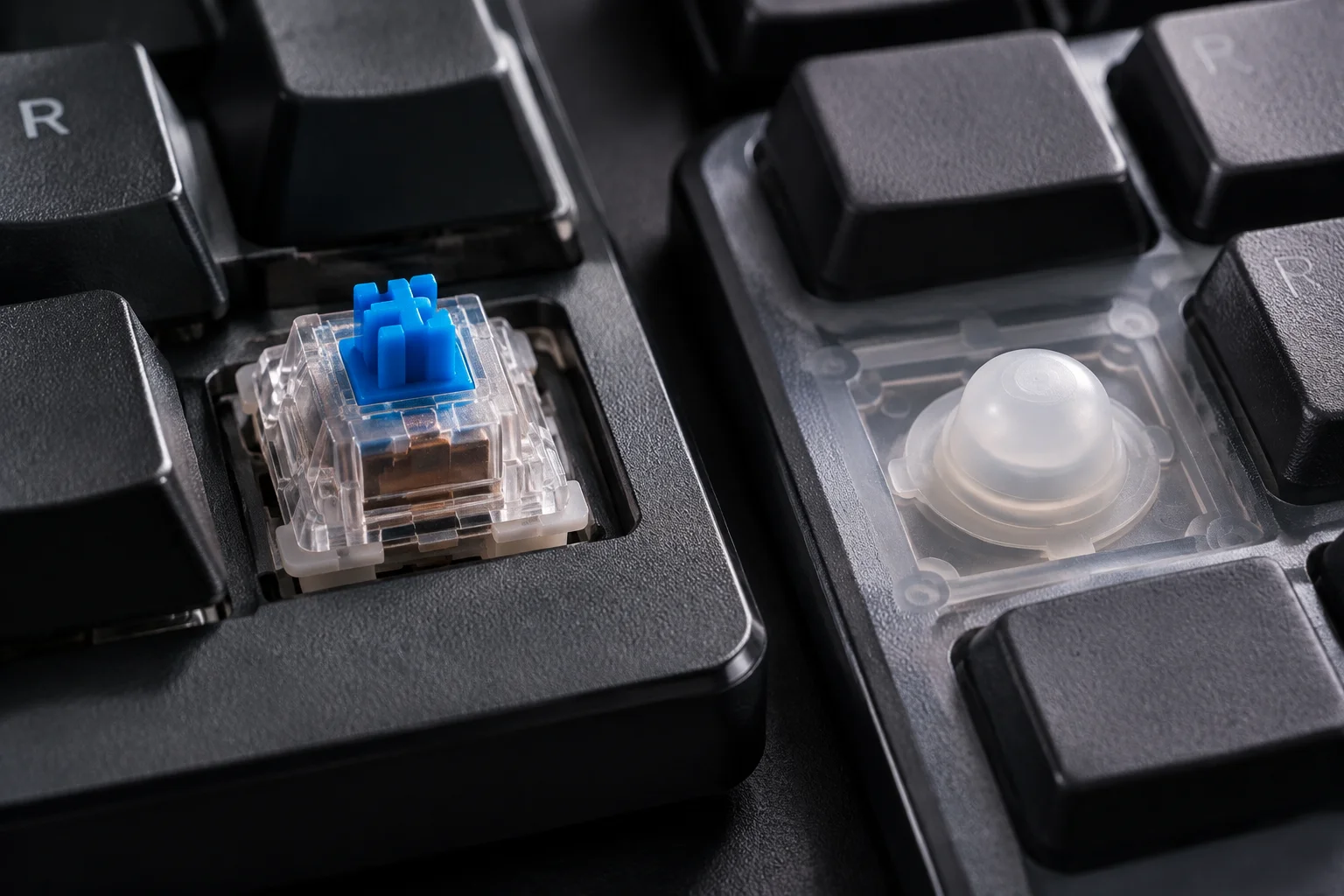
Selecting the right typing instrument is one of the most consequential decisions you can make for your everyday desk comfort. While mechanical boards rely on discrete individual spring-loaded switches beneath every keycap, membrane units register inputs through a continuous flexible silicone or rubber sheet layered over electrical circuit traces.

This architectural variance produces fundamentally divergent sensory experiences. A mechanical switch registers actuation halfway down the stroke with distinct feedback, whereas a membrane dome requires a full downward press to compress the rubber dome against the underlying membrane contact point.

Benchmark Comparison

Key Performance Metrics at a Glance

01
50M–100M Clicks switch lifespan for mechanical vs 5M for membrane
02
2.0 mm Average actuation point for mechanical vs 3.8 mm bottom-out
03
N-Key Rollover capability preventing ghosting during fast input

Essential Takeaways for Desk Workers and Gamers

  • Mechanical keyboards offer customizable actuation forces, varied switch characteristics (linear, tactile, clicky), and replaceable switches via hot-swap sockets.
  • Membrane keyboards deliver whisper-quiet operation straight out of the box, making them reliable options for open-plan offices and shared workspaces.
  • Typing ergonomics improve noticeably with mechanical switches because fingers don't need to slam into a hard backplate on every single keystroke.
  • Membrane models excel at splash and dust resistance thanks to sealed rubber sheets, whereas mechanical switches require regular dusting and maintenance.
Deep Dive

Tactile Precision Versus Quiet Convenience

When Mechanical Switches Excel: Speed, Feedback, and Longevity

Mechanical keyboards are engineered around modularity and consistent feedback. Because each key operates on its own dedicated switch housing with metal leaves and a steel coil spring, the actuation happens before bottoming out. Touch typists often discover that after a short adjustment period, their typing fatigue decreases drastically because hands learn to float over keys without bottoming out with excessive force.

Furthermore, repairability and customization set mechanical boards apart. If an individual switch fails or feels gritty after years of intensive drafting, desoldering or simply pulling it out with a switch puller on hot-swap boards allows a quick replacement in seconds without discarding the entire peripheral.

PRO TIP

Testing Switch Varieties Before Committing

If you work in a shared room or quiet studio, look specifically into silent tactile or silent linear switches equipped with internal silicone dampeners. They combine the responsive tactile feel of mechanical design with sound levels comparable to quiet membrane domes.

When Membrane Makes Sense: Travel Portability, Quietness, and Value

Membrane keyboards remain the industry standard across corporate offices, laptops, and budget setups for very pragmatic reasons. Their lightweight profile and monolithic membrane sheet make them exceptionally quiet during active video conferences or late-night study sessions where loud key chatter would disturb colleagues or roommates.

They are also lightweight and resilient against inadvertent coffee splashes or crumb intrusion since the rubber membrane layer forms a physical barrier protecting the electronic traces beneath. For mobile professionals carrying peripherals inside backpacks, slim membrane keyboards offer unmatched portability without adding noticeable weight.


Common Questions

Frequently Asked Inquiries

Yes. By choosing factory-lubricated silent switches (such as silent red or silent peach stems), adding switch dampening pads, and using thick PBT keycaps with internal desk mats, a mechanical keyboard can operate just as quietly as a membrane keyboard while retaining crisp tactile actuation.

Gamers prioritize mechanical boards for consistent actuation points, higher polling rates, and true N-Key Rollover (NKRO). Membrane keyboards often suffer from key jamming or ghosting when pressing three or more simultaneous keys during intense gameplay maneuvers.

If you spend four or more hours typing daily, the reduction in finger strain and the ability to choose an actuation weight matched to your hand strength provides significant ergonomic relief and typing accuracy that justifies the investment.

Chris Davis
Article Author

Chris Davis

Hardware specialist and workspace ergonomics enthusiast testing peripherals, desk setups, and mechanical keyboards for over a decade.

Share this guide
Link Copied!

Upgrade Your Desk Peripherals Today

Discover high-precision mechanical boards, ergonomic mice, and curated desk accessories designed for peak daily performance.

Community

Comments & Discussion

User avatar
Gamer99
10/24/2026

Mechanical is the only way to go.

User avatar
OfficeWorker
10/27/2026

I prefer membrane, it's quieter for calls.